The blunt truth is that the visually striking, two-column resume you spent hours designing on Canva is likely the exact reason you are receiving automated rejection emails.
It is not about your qualifications. It is about the fundamental, underlying mechanics of how Applicant Tracking Systems (ATS) extract, parse, and score data.
Selling “modern resume templates” is a massive, profitable industry, but these templates are built by graphic designers, not technical recruiters or software engineers. If you want to bypass the algorithm, you need to stop thinking like an artist and start thinking like a machine.
Here is the unvarnished, highly technical breakdown of why two-column layouts are a disaster for your application, and why engineering a machine-readable, single-column document must always take priority over graphic design.
Executive Summary: Do Two-Column Resumes Pass ATS?
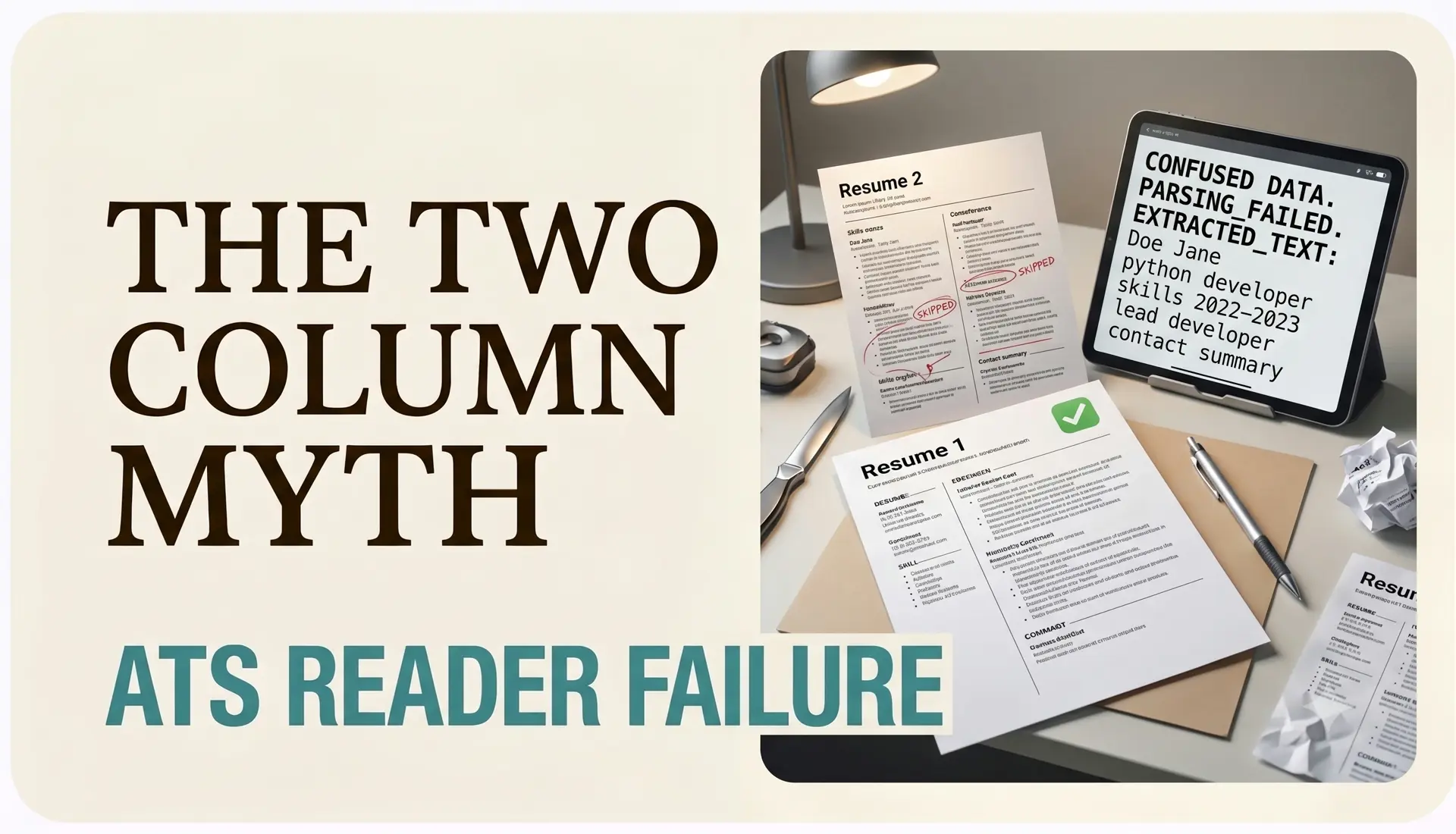
No, two-column resumes do not reliably pass Applicant Tracking Systems. When an ATS parses a two-column PDF or Word document, it strips away the visual layout and reads the raw text left-to-right. Because it cannot distinguish between the left column and the right column, the parser mashes unrelated sentences together, resulting in corrupted data, miscategorized skills, and an artificially low keyword match score.
1. The Left-to-Right Parsing Failure
To understand why two-column templates fail, you must understand how an ATS extracts text from a document.
Applicant Tracking Systems do not have human eyes. When you upload a PDF or DOCX file to a platform like Workday, Taleo, or Greenhouse, the ATS does not “look” at the page layout. Instead, it utilizes a text-extraction algorithm that strips away all CSS, column structures, tables, and visual formatting to access the raw text layer underneath.
Almost all enterprise parsers read this raw text linearly: top-to-bottom, left-to-right.
If you have a narrow left column dedicated to “Skills” and a wider right column dedicated to “Experience,” the parser does not read down the left column first and then down the right. It reads straight across the horizontal plane.
What you see: (Left Column) Node.js (Right Column) Engineered a highly scalable backend infrastructure.
What the ATS reads:
Node.js Engineered a highly scalable backend infrastructure.
While this single line might seem harmless, imagine this happening across 40 lines of text. Your software skills are mashed into your education dates. Your contact information is appended to your previous employer’s name. The result is a single, unreadable block of garbage text.
The Verdict: The ATS fails to categorize your data. Your skills are not logged in the “Skills” database, and your experience is flagged as corrupted. You are automatically filtered out.
2. Orphaned Data and Disappearing Contact Information
Many two-column templates reserve a tinted sidebar for contact information: email, phone number, physical location, and LinkedIn URL.
ATS software uses strict Regular Expressions (Regex) to identify and categorize contact data. It expects to find an email address (e.g., text@domain.com) and a phone number clustered together at the very top of the document structure (the standard header).
When you place this information in a side column, two things happen when the formatting is stripped:
- The contact information is pushed down into the body text.
- It is jammed next to a job title or a random skill.
If the ATS cannot definitively identify your email address or phone number because it is sandwiched between a bullet point and a graduation date, the system physically cannot create a candidate profile for you.
The Verdict: You are essentially submitting an anonymous resume. Even if you score a 95% keyword match, recruiters have no automated way to contact you because your profile lacks an email address.
3. The Invisible Code: Text Boxes and Tables
To achieve a two-column look in Microsoft Word or Google Docs, template creators have to cheat. They use invisible tables or floating text boxes to force the text to sit side-by-side.
This is the kiss of death for ATS optimization.
Modern ATS parsers aggressively strip non-standard formatting. If your text is trapped inside a floating UI element (like a text box) rather than existing in the primary document flow, the parser will frequently delete the container and all the text inside it.
The Verdict: Half of your resume is permanently deleted before the algorithm even begins scoring it. You are trading your professional history for aesthetics.
4. Keyword Dilution and Contextual Scoring Loss
Scoring high in an ATS requires more than just keyword stuffing; it requires contextual keyword density.
It is not enough to just have the word “Python” floating on the page. Advanced semantic algorithms (like those used by Eightfold.ai or modern Greenhouse setups) analyze the surrounding text to determine if “Python” was a tool you used to drive millions in revenue at a Senior level, or just a word you listed in a sidebar.
Two-column layouts destroy this context. By physically separating your skills list from the bullet points where you actually applied them, you sever the relationship between your capabilities and your measurable impact. The ATS sees a list of isolated nouns, not a cohesive narrative of technical execution.
The Verdict: You are artificially capping your ATS score. A machine cannot infer that the skills in column A apply to the jobs in column B.
The Only Exception to the Two-Column Rule
There is exactly one scenario where a two-column, highly designed resume is acceptable: when you are handing a physical, printed piece of paper directly to a human being.
If you are attending an in-person networking event, a university job fair, or sitting face-to-face in a final round interview, a visually appealing, two-column resume can serve as a great marketing document. Human eyes appreciate white space and scannability.
However, for digital applications submitted through a portal, LinkedIn, or an online job board, a two-column format is professional suicide.
Frequently Asked Questions (AEO Quick Answers)
Can Workday read a two-column resume?
No. Workday is notorious for its rigid parsing engine. It typically reads text strictly left-to-right, meaning it will combine the text from your left and right columns into nonsensical sentences, requiring you to manually re-type your entire work history into their portal.
Are Canva resumes ATS friendly?
Most Canva resumes are not ATS friendly. Canva is a graphic design tool, meaning it exports text as layered elements or even flattened images. An ATS cannot accurately parse the layered text boxes used in 99% of Canva’s resume templates.
What is the most ATS-friendly resume format?
The most ATS-friendly format is a single-column, brutalist layout saved as a standard PDF. It should use standard semantic headers (e.g., “Experience”, “Education”, “Skills”), standard bullet points, and absolutely no tables, graphics, columns, or floating text boxes.
The Solution: The Single-Column Brutalist Approach
If you want to secure high-tier interviews, you must engineer your resume for the machine first, and the human second.
Revert to a single-column, top-to-bottom layout. Standardize your hierarchy to follow the exact order an ATS expects:
- Header (Name & Contact)
- Professional Summary
- Experience
- Projects (if applicable)
- Education
- Skills
If your resume does not look like a boring, highly structured technical document, it is not optimized for a machine. Strip out the fluff, fix the layout, protect your data integrity, and let your actual career achievements do the heavy lifting.
Stop formatting. Start applying.
We built CleanATS to force your resume into the exact layout modern hiring parsers demand. It completely handles the margins, the typography, and the structural hierarchy for you.